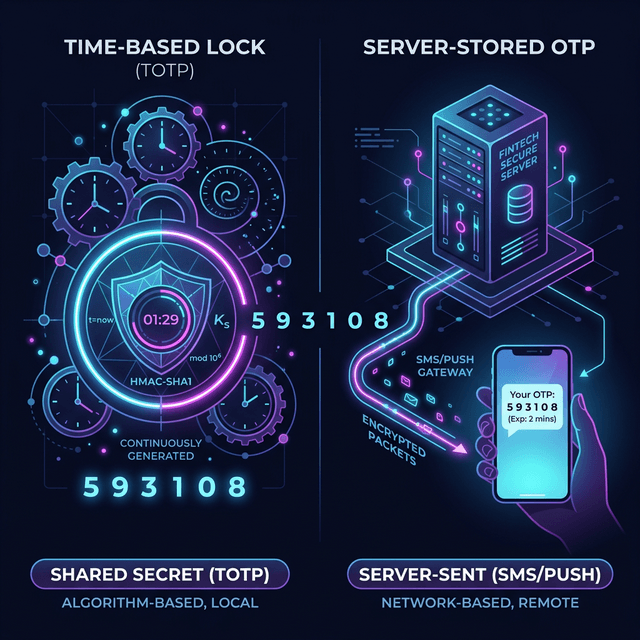
If you use enough apps, you start seeing the same screen again and again.
Enter a 6 digit code.
Maybe it says the code expires in 30 seconds. Maybe it says resend OTP. Maybe it comes from an authenticator app, maybe it comes as an SMS.
From the user side, this all feels like one thing.
From the backend side, it is not one thing at all.
There are two very common models hiding behind that familiar OTP screen:
- TOTP
- server-stored OTP
This project is a small Go prototype for both, but the idea matters more than the code. If you understand the difference between these two models, a lot of auth flows start making more sense.
01The big idea
Both systems can show the user a 6 digit number that feels temporary.
That is where the similarity ends.
One system is based on shared secret and time.
The other system is based on generating a random value and storing it for a while.
That difference changes what the server has to keep, how verification works, what can fail, and how the system scales.
02Part 1: TOTP
TOTP stands for Time-based One-Time Password.
This is the model used by authenticator apps like Google Authenticator, Authy, Microsoft Authenticator, and many MFA setups in developer tools, cloud platforms, and internal company systems.
The important thing to understand is this:
The server does not create a fresh OTP and save it somewhere.
Instead, both sides already share a secret.
Usually the setup flow looks like this:
- the server generates a secret
- the secret is shown as a QR code or setup key
- the user scans it in an authenticator app
- now both the app and the server know the same secret
After that, neither side needs to send codes back and forth just to create them.
They can both generate the code on their own.
03How TOTP generates a code
At a high level, the inputs are:
- a shared secret
- the current time
The time is usually broken into fixed windows, very often 30 seconds.
So instead of thinking "what time is it right now down to the exact second", the system thinks more like:
- we are in time window 100
- now we are in time window 101
- now we are in time window 102
The app takes:
- the secret
- the current window number
Then it runs them through a hash-based algorithm and turns the result into a 6 digit number.
The server does the same thing on its side.
If both sides have:
- the same secret
- roughly the same time
they will arrive at the same code.
That is why TOTP feels a little magical the first time you understand it. The server is not checking a code it previously stored. It is checking whether it can independently arrive at the same answer.
04Why TOTP servers often accept nearby windows
Phones and servers are not always perfectly in sync.
Maybe the phone clock is slightly behind. Maybe the network delay is weird. Maybe the user typed the code at the edge of a 30 second boundary.
So many TOTP implementations do not only check the current window. They also check the previous and next one.
In plain words, they do something like:
- try current 30 second slot
- try the slot just before it
- try the slot just after it
If any of those match, the code is accepted.
This does not mean the OTP really lasts 90 seconds in the product sense. It means the verification logic is giving some tolerance for clock drift and timing edges.
That distinction matters.
05What is nice about TOTP
TOTP has a few properties that people like:
- the server does not need to store every OTP
- no SMS delivery dependency
- no waiting for a message
- the code can be generated offline on the phone
- it works well for MFA
That is why TOTP is common in security-focused systems.
06What can go wrong with TOTP
TOTP is simple in concept, but there are still practical issues:
- the user can lose the device with the authenticator app
- the clock on the device can drift
- recovery flows can become painful
- onboarding is slightly more complex than just sending an SMS
So while it is elegant, it is not always the easiest option for casual login flows.
07Part 2: Server-stored OTP
This is the flow most people think about when they hear OTP in everyday apps.
You type your phone number.
The app says it sent a code.
You get an SMS with six digits.
You enter the digits.
The server says valid or invalid.
This is not TOTP.
In this model, the server creates a random code and stores it temporarily.
That is the key idea.
The flow usually looks like this:
- user asks for OTP
- server generates a random 6 digit code
- server stores it with an expiry time
- server sends it by SMS or email
- user enters the code
- server compares the input with the stored code
- server also checks whether the code expired
This is much more direct than TOTP. There is no shared secret math happening on the user device. The code exists because the server made it and kept it.
08Where the code is stored
In real systems, this is often stored in:
- Redis
- a database
- a cache layer
The important part is not the specific storage engine. The important part is that the server has state.
That state usually includes at least:
- who the OTP belongs to
- the OTP value or a hash of it
- when it expires
- sometimes attempt count or resend count
That is what makes this model different from TOTP. The server is not recomputing the answer from math. It is looking up temporary state.
09Why this flow is so common
It is popular because it is easy to explain and easy for users:
- enter phone number
- get code
- type code
No setup app. No QR scan. No secret provisioning.
That makes it a natural fit for:
- consumer apps
- delivery apps
- marketplaces
- support flows
- sign up and login screens
- many banking OTP flows
It is especially common when the product wants identity tied to a phone number.
10What can go wrong with server-stored OTP
This model has its own set of problems:
- SMS can be delayed
- SMS can fail entirely
- users may request too many codes
- the server has to manage expiry and retries
- phone-based auth has abuse and fraud risks
- storage and rate limiting become part of the auth system
So while it is operationally simple to understand, it comes with its own infrastructure and security concerns.
11Same UI, different backend
This is the part people often miss.
A TOTP screen and an SMS OTP screen can both show:
- six input boxes
- a 30 second timer
- a resend button
- a success or failure state
From the UI, they look like cousins.
Under the hood, they are doing different jobs.
TOTP says:
"We both know the same secret. Let us see if we get the same answer for this time window."
Server-stored OTP says:
"I generated a code earlier. Let me check whether it still exists and whether you sent the same one back."
That is a completely different backend story.
12A simple mental model
If you want a quick way to remember the difference, use this:
TOTP is math.
Server-stored OTP is memory.
TOTP depends on:
- secret sharing
- time windowing
- deterministic verification
Server-stored OTP depends on:
- random generation
- temporary storage
- expiry checking
That one distinction clears up most confusion.
13Why the prototype in this repo is useful
The Go code in this repo is intentionally small.
It is not trying to be a production auth service. It is trying to make the mechanics visible.
The TOTP demo prints:
- the secret
- the Unix timestamp
- the current time window
- the generated code
- what windows the server checks
The stored OTP demo prints:
- the generated code
- when it expires
- a successful validation before expiry
- a failed validation after expiry
That is enough to show the actual difference without hiding it behind a lot of framework code.
14When to use which one
There is no single answer for every product.
TOTP is great when:
- you want stronger MFA
- you want users to use an authenticator app
- you do not want every OTP stored on the server
- you care about a more security-oriented flow
Server-stored OTP is great when:
- you want easy phone-based login
- you want zero setup friction
- you are doing SMS or email verification
- you are building a consumer onboarding flow
A lot of systems actually use both in different places.
For example:
- SMS OTP for signup or phone verification
- TOTP for account security or 2FA later
15Final thought
OTP is one of those things that looks simple until you ask one extra question:
"Where did this code come from?"
If the answer is "both sides computed it from the same secret and time", that is TOTP.
If the answer is "the server generated it and stored it for a short time", that is a server-stored OTP flow.
Same 6 digits.
Very different systems.